


digiPunchCard
3.423.00 Reviews
App Specs
- Version
- 3.0.0.71
- Updated On
- License
- Free
- Downloads
- 10,000+
- Developer
- Digital Punch Card
- Categories
- Business
- Platform
- Android
Screenshots
 Analysis by AppCompare
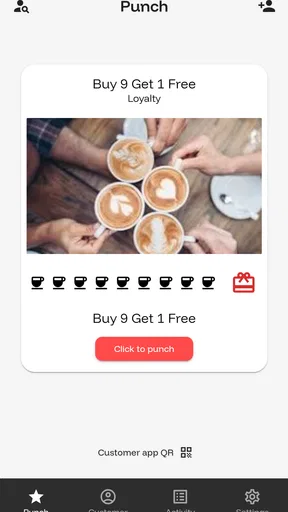
I tried digiPunchCard as a small-business loyalty tool, and my first impression was that it is aimed at replacing the familiar paper stamp card with something easier to manage digitally. That sounds simple, but the practical value depends on how a business handles repeat customers, staff handoffs, and the moment when a customer expects a reward to be recorded correctly. In that setting, this free Business app from Digital Punch Card has a clear purpose: help a shop run a loyalty routine without keeping a box of cards behind the counter.
The app is not really a household rewards app, even though shared-device use is worth thinking about. A family might use one tablet or phone while helping with a small home business, a market stall, or a service activity, but the loyalty records belong to the business and its customers. That distinction matters. I would not treat the app as a shared family account for personal errands, nor would I assume that every person using the same device should have the same access. Its usefulness comes from organizing customer loyalty, not from managing household points or coordinating family chores.
How digiPunchCard fits a real shared-use routine
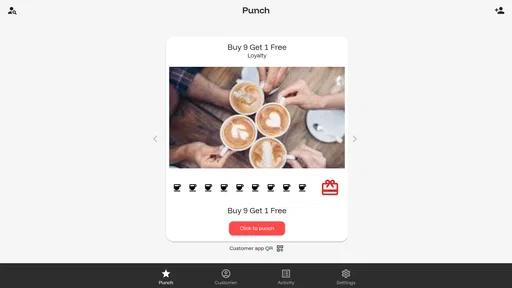
My most realistic use case is a small café, salon, food truck, or independent shop where several people may take turns serving customers. One person can handle the opening routine, another can cover a busy afternoon, and the owner may review the loyalty process later. A digital punch card makes sense here because the customer does not need to remember a paper card, and the business does not need to rely on a stack of cards that can be lost, damaged, or forgotten at home.
The shared-device angle changes the way I would introduce it. If the app is used on a counter tablet, the device should be treated as a business tool rather than a personal phone. Staff should know when a loyalty action is being recorded and should avoid leaving the screen available when the device is unattended. That is not a special feature of this app; it is simply good operational discipline when customer activity is handled on a shared screen.
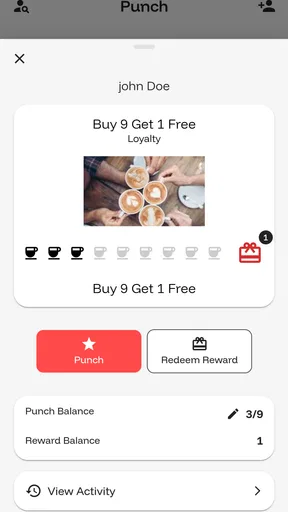
A useful everyday workflow would be straightforward. A customer returns, the staff member opens the loyalty tool, records the visit or purchase according to the business routine, and the customer leaves with a clearer sense of progress toward a reward. The important part is consistency. If one employee records every eligible visit while another forgets, the digital format will not solve the underlying process problem. I would create a short counter routine and make sure everyone follows the same interpretation of an eligible purchase.
That is one of the less obvious trade-offs here: a digital punch card can reduce paper clutter while making staff habits more visible. With paper, an inconsistent employee may simply hand back a card and move on. With an app-based system, the business expects the record to be updated at the right moment. The tool is therefore most helpful when the owner is willing to define the routine, not when the owner hopes software alone will create one.
Keeping business use separate from personal use
Because a shared phone or tablet can be used by more than one person, I would decide in advance who is responsible for the app. If a family owns the business, one person might set it up while another handles daily customer interactions. That arrangement can work, but the people involved should agree on who checks the loyalty records, who handles changes to the program, and who answers a customer’s question when a punch appears to be missing.
Worth Reading Before You Choose

EA SPORTS FC Mobile 26 Is a Bigger Football Game, but It Takes Time

Flipboard Shows What News Apps Must Do Beyond the Feed

Switching to Android Auto Means Rethinking Your Driving Routine

Google Calendar Makes a Crowded Week Easier to Manage

Ludo King Makes the Most of the Minutes Between Plans

Baby Panda World Brings Quick Play to Modern Phones, but Its Game Library Feels Busy
I would also avoid switching casually between a personal device and a shared counter device without a clear reason. Even when a business is very small, moving between devices can create confusion about which screen is current and who is expected to complete the next action. A single, clearly designated device is easier for a small team to understand. If the business needs a more complex multi-location or multi-user system, I would compare dedicated loyalty platforms before committing to a simple punch-card app.
This is especially important for a household business where the same person may use the phone for banking, messages, and customer service. The app itself may be free to install, but the real cost can be the attention required to keep personal and business activity separate. I would use a dedicated work profile or device arrangement where possible, not because digiPunchCard is unusual in this respect, but because customer-facing tools should not be mixed carelessly with private activity.
What setup feels sensible before the first customer
The app is listed as free, which lowers the barrier for a small business that wants to test a digital loyalty approach. At the same time, in-app purchases are listed from $0.99 to $649.99 per item. That is a wide range, so I would not assume that every useful business option is included at no cost. Before inviting regular customers into the program, I would examine each paid option carefully and decide whether it solves a real operational need or merely adds convenience.
My advice would be to begin with a small pilot rather than announcing the program to everyone immediately. Use the app with a few regular customers, observe where staff hesitate, and check whether customers understand how their progress is being handled. This catches practical problems early: unclear eligibility, forgotten updates, or a reward process that sounds better than it feels at the counter.
A second worthwhile step is to write the loyalty rule in plain language. For example, the business should know whether a qualifying visit means any purchase, a particular product, or a minimum transaction. I am not claiming the app decides that policy for you. The business still has to define it. The clearer the rule, the less likely a shared device will become the source of arguments between staff and customers.
The current version is 3.0.0.71, and the app requires Android 8.0 or later. That makes device compatibility part of the setup conversation. If an older phone or tablet is being reused for the counter, I would check its Android version before planning around it. A business that relies on an old device should also test the app under the exact conditions in which it will be used, including the available screen size and the staff member’s comfort with the controls.
Coordination when more than one person serves customers
Coordination is where a basic loyalty app can either earn its place or become another task to remember. In a one-person shop, the workflow may be easy because the owner sees every transaction. In a family-run business, the situation is different: one person may know the customer history while another is serving. The app can support the routine, but it cannot replace a shared understanding of what has happened.
I would create a handoff habit. At the end of a shift, the person leaving should mention any unusual loyalty situations, such as a customer asking about a reward or a transaction that needs checking. This is a small step, but it prevents the next person from making a promise without knowing the context. A digital record is useful only when the people using it trust the record and know how to interpret it.
Another practical tip is to avoid updating a customer’s loyalty status while distracted by a queue. If the counter is busy, staff may be tempted to guess, postpone the action, or tap through too quickly. That is precisely when mistakes are likely. I would rather have a simple, repeatable moment in the transaction for recording the punch than ask employees to reconstruct several customers’ visits later.
There is also a human side to shared use. A customer may feel uncomfortable if a staff member hands over a device and expects them to navigate without explanation. I would keep the interaction brief and explain what is being recorded in ordinary words. Customers should not have to understand the app’s internal structure to know whether their visit counted.
Age, trust, and customer-facing use
The content rating is Everyone, which fits the app’s business purpose and makes it suitable for general audiences in a public-facing environment. That does not mean every child should be allowed to operate a business loyalty record without supervision. In a family shop, a young person might help at the counter, but I would give them a narrow, clearly explained task and keep an adult responsible for customer disputes, paid options, and any account decisions.
Shared-device trust is more important than the age label. A child helping with a stall, a teenager covering a counter, and an adult owner may all have different levels of responsibility. I would not hand over unrestricted control simply because the app is rated for Everyone. The business should decide who can change the loyalty setup, who can correct a record, and who can approve a reward. If the app does not match that level of role separation, a more advanced business platform may be safer.
This is also why I would explain the loyalty process to customers instead of assuming the screen speaks for itself. Trust grows when people know what action is taking place and why. If a regular customer says a visit was missed, the staff member should have a calm way to check the situation rather than treating the app as automatically infallible. Digital records are convenient, but they are still records entered by people.
For a household using the same device for several purposes, I would be particularly careful around notifications, saved sessions, and visible customer information. I am not assigning specific privacy behavior to digiPunchCard beyond what is known about its purpose. I am saying that a public counter device should be positioned and managed like a business device. Anyone considering it should review the app’s current permissions and account behavior during setup and make a choice that fits the business’s responsibilities.
Where it is stronger than paper cards
The obvious advantage over paper is convenience. Customers do not need to carry a physical card, and a business does not need to print replacements every time a card disappears. A digital approach can also make the loyalty process feel more current, especially for a small business that wants to offer something simpler than a stamp pad without buying a large customer-management system.
There is a less obvious advantage in training. A paper system can look flexible, but that flexibility often means each employee interprets it differently. A digital punch-card routine encourages the business to define one method and repeat it. For a family business, that can make handoffs more predictable. The benefit is not sophisticated analytics; it is the reduction of small inconsistencies that wear down customer confidence.
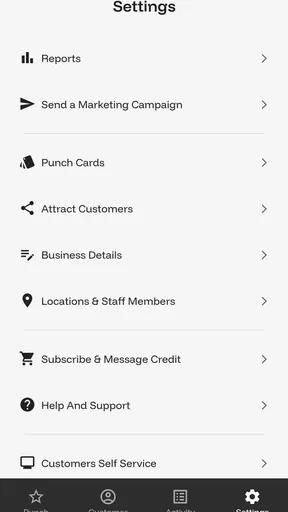
Compared with a full customer relationship management platform, digiPunchCard is likely to appeal to businesses that want a focused loyalty task rather than a large system covering marketing, appointments, inventory, and detailed customer profiles. That narrower approach can be a strength. A café owner who only wants a repeat-visit incentive may prefer a small tool that is easier to explain than a platform requiring extensive configuration.
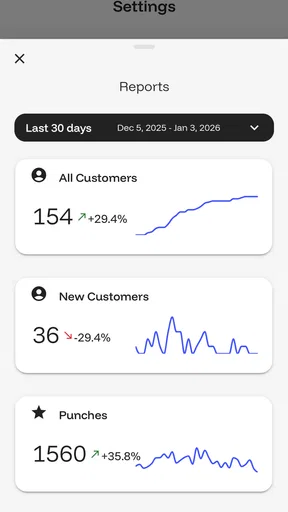
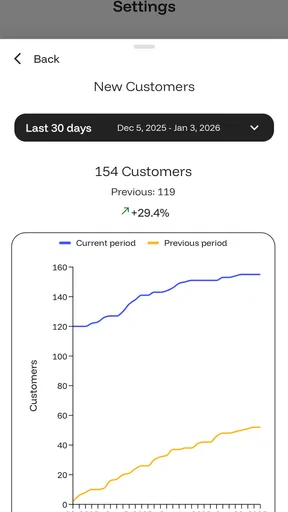
The trade-off is that a focused punch-card app may not be the right foundation for a growing operation with multiple locations, complex rewards, staff permissions, detailed reporting, or integrations with a point-of-sale system. I would choose the simpler route when the loyalty rule is simple and the team is small. I would look elsewhere when the business needs loyalty to connect tightly with sales records or when several branches must share one carefully controlled program.
Who should use it, and who should skip it
I can see digiPunchCard working well for an independent shop that wants to move away from paper without turning loyalty into a major technology project. It is also a reasonable trial for a new business that wants to learn whether customers respond to a repeat-visit incentive before paying for a larger platform. The free entry point makes experimentation easier, while the Everyone rating suits a public counter environment.
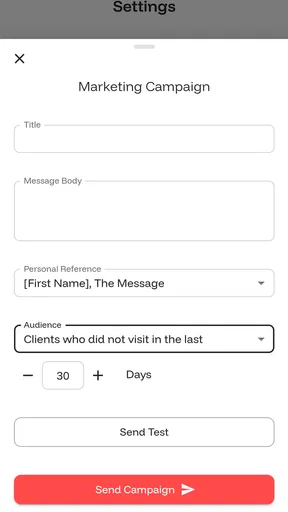
I would be more cautious if the business expects the app to manage every part of customer retention. A punch card is only one type of loyalty program. It does not automatically create a compelling reward, repair weak service, or tell an owner why customers stop returning. If the business needs segmentation, campaigns, detailed reporting, or tightly managed employee roles, a broader system may justify its extra complexity.
I would also skip it for a purely personal household reward scheme. The app’s identity is business-focused, and using a business loyalty tool to track family errands would add unnecessary boundaries and questions. A shared household device can be part of a small business workflow, but that is different from treating the app as a family organizer.
Before installing it, I would answer four practical questions. Which device will be used at the counter? Who is responsible for updating records? What exactly qualifies for a punch? And what happens when a customer disputes a missing entry? If the owner can answer those questions clearly, the app has a fair chance of fitting the operation. If not, the problem is likely to be workflow rather than software.
My household and small-business verdict
digiPunchCard feels most useful when a small, trusted team needs a simple digital replacement for a paper loyalty card. I like the focused idea, the free starting point, and the way a consistent digital routine can help a family-run business coordinate customer visits across a shared counter device. The app has a clear job, and it does not need to become a full business-management suite to be worthwhile.
My reservations are equally practical. Shared use requires boundaries, staff need a common procedure, and the listed in-app purchase range means I would inspect costs before expanding beyond a basic trial. The modest average rating of 3.4 from around 57 ratings and 23 reviews suggests that I would test the current experience personally rather than making it the backbone of a busy operation immediately. Those figures do not make the app unusable, but they do reinforce the value of a small pilot.
After that pilot, my decision would depend on scale. For one location, a straightforward reward, and a household or small team that communicates well, I would consider keeping it. For a business that needs deep reporting, complex permissions, or close point-of-sale integration, I would choose a more specialized loyalty platform. The best reason to try digiPunchCard is not that it promises to solve every retention problem; it is that it may make one repeat-customer routine easier to run consistently.
Pros
- Simple digital alternative to paper loyalty cards
- Quickly check available rewards and stamp progress
- Useful for keeping several business cards in one place
- Reduces the risk of losing physical punch cards
- Can encourage repeat visits with visible reward goals
Cons
- Benefits depend on participating businesses using digiPunchCard
- Some features may require account creation or personal details
- Not every local store or service may be supported
- Losing phone access can make rewards temporarily unavailable
- Notifications may become unwanted if too many businesses are added
FAQs for digiPunchCard
What is digiPunchCard and how does it work?
digiPunchCard is a digital loyalty-card app designed to help customers collect punches or stamps from participating businesses without carrying a paper card. After opening the app, you typically select or join a participating loyalty program, then have the business record each eligible purchase. Once the required number of punches is reached, the app displays the available reward and provides the relevant redemption information.
Do I need an account or personal information to use digiPunchCard?
The exact requirements may depend on the participating business and the version of the app, but digiPunchCard may ask you to create an account or provide basic details such as an email address, phone number, or name. Registration can help synchronize your rewards across devices and recover your loyalty history. Before signing up, review the app’s privacy policy and check which permissions and data are requested.
How do I receive punches, stamps, or loyalty rewards in digiPunchCard?
Punches are generally added when a participating merchant verifies an eligible purchase, often by scanning a code, entering a transaction, or confirming the visit through the app. Requirements can vary between businesses, including minimum spending amounts, excluded products, or limits on daily punches. Always check the individual program’s rules, and confirm that the punch appeared before leaving the store.
Can I use digiPunchCard at any store, and are rewards transferable?
digiPunchCard is not necessarily accepted everywhere. Its usefulness depends on whether your favorite shops, restaurants, or service providers have created loyalty programs on the platform. Rewards are usually connected to the specific business and account that issued them, so they may not be transferable to another person or merchant. Check each program’s terms for expiration dates, redemption restrictions, and account limitations.
What should I do if my punches or rewards are missing in digiPunchCard?
If a purchase does not appear correctly, first check that you were using the right account and that the transaction met the program’s conditions. Close and reopen the app, verify your internet connection, and look for pending updates. If the punch is still missing, keep your receipt and contact the participating business, since the merchant may need to verify or manually correct the transaction. For technical problems, use the app’s available support channel.


